Yearly Archives: 2022

I have been taking my cars to Ralph’s Auto Service here in Asheville for going on 14 years.  Ralph (not his real name) might be best described as Carolina cordial — I had to remind him again last week that he didn’t need to call me Mr. Collins — and he is definitely a man of few, carefully-chosen words.  But Ralph is Mr. Reliability when it comes to delivering on what he promises, and that’s what matters here.

When I call Ralph for an appointment, he answers, “Ralph’s Auto,” in such a sober tone that it makes me want to take a box of donuts over to his shop to perk things up.  (And yes, we have done so.)  Given Ralph’s general demeanor, I had to smile when I looked over the service receipt* from my last oil change and how Ralph filled it out:
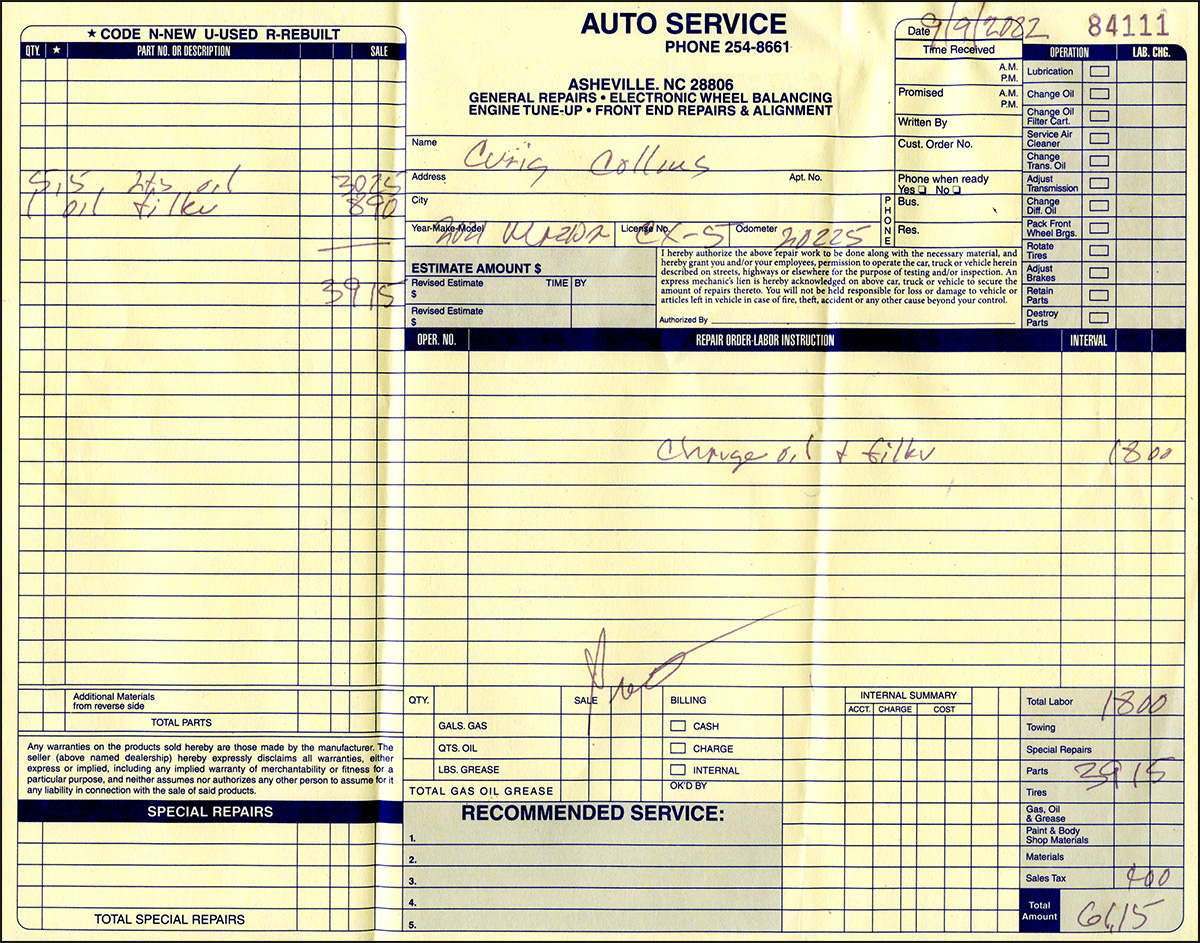
It struck me that the most interesting thing about this form is the fact that Ralph uses it.  The only fields he fills out faithfully are the service date, customer name, make and model, odometer reading and amount due.  Everything else on this exhaustively subdivided form gets entered in a style one could call mechanic minimalist — the lone organizing principle being “Parts on Left, Labor on Right.”

This begs the question: in what anal-retentive universe would any car mechanic come up with a form like this?  Certainly not the one Ralph lives in.  I’m thinking military.


Take the ESTIMATE section.  Ralph’s form provides for an initial estimate, then a revised estimate (with time and date and initials!) and even a third revised estimate:

What the hell kind of repair involves three estimates from one shop?  You can be sure that Ralph would show you the door before offering you even a second estimate, because you would already have proven yourself to be too much trouble.

Predictably, Ralph has never filled out the ESTIMATE section for anything his shop has done for me.  All our agreements have been verbal handshakes.  Someday, I should ask Ralph if he has filled in this part of the form for any repair, ever — or would doing so mean that the job is more trouble than it’s worth?  I think I already know the answer.
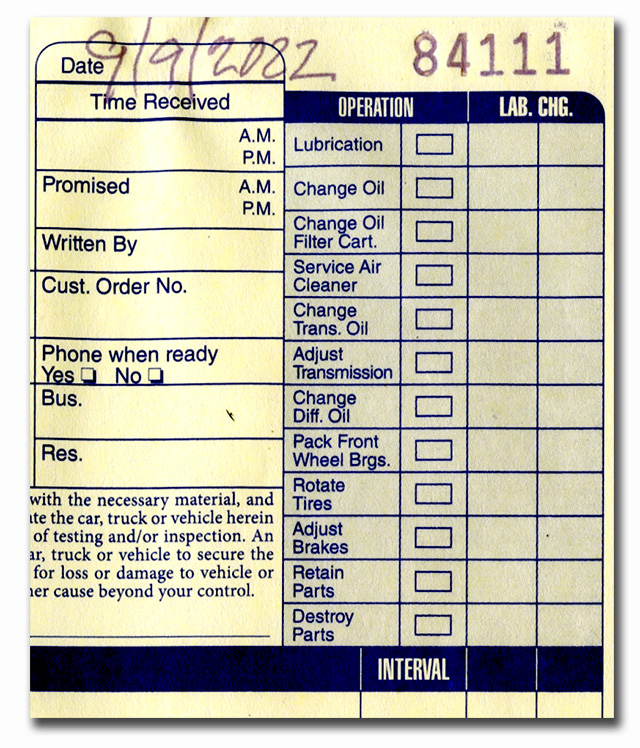

In the upper right, we find more laughers like the Time Received and Promised boxes, complete with AM and PM symbols to save precious time and ink.

These are one-upped by the Phone When Ready Yes/No checkboxes.  Way back when, I would ask Ralph to call me when my car was ready, and he would always say, will do, but he hardly ever did.  He probably just forgot to check Yes    .

I love the throwback Pack Front Wheel Bearings checklist item.  Hey, couldn’t we all use a good front-wheel-bearing packing right about now?
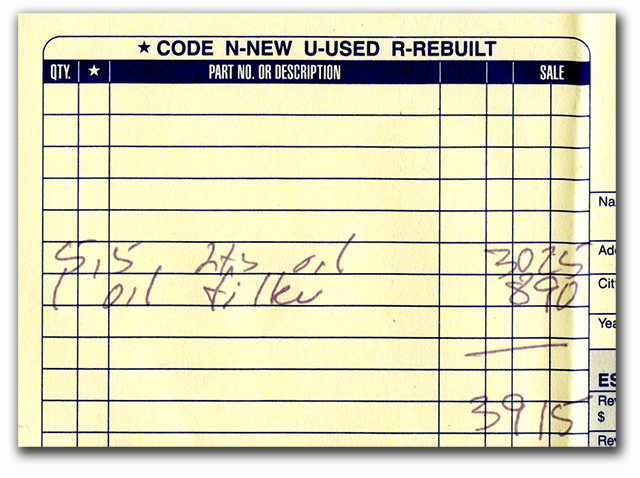

The PART NO. OR DESCRIPTION area of the form has a dedicated column   to encode new/used/rebuilt, plus two extra columns with no headings, I guess so that ambitious service guys can invent their own codes.

Needless to say, Ralph doesn’t use codes and doesn’t “color inside the lines” — his words, figures and sums just go where they go.


Which brings us to that tortuously-titled REPAIR ORDER LABOR INSTRUCTION area, where labor gets its due.  Ralph’s narrative looks a little lost floating inside this big box.
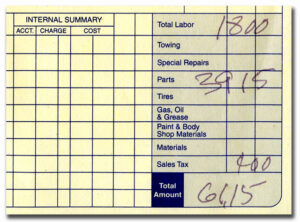

Finally the bottom line.  Don’t get distracted by those INTERNAL SUMMARY columns to the left because, rest assured, Ralph isn’t. The only accounts that matter to Ralph are  accounts receivable, as in Total Amount  .

The shaded area neatly sums up how this form splits far too many hairs.  There are no Special Repairs or Towing in Ralph’s world, just labor, parts and tax.

Ralph’s worldview is very anti-box and very American.  He would hate filling out this form if he gave it much thought, so he doesn’t think about it much.  My guess is, Ralph has got several boxes of these forms in the back to use up, so he will just ignore all the extraneous bullshit on them until they’re gone.

__________

* The identifying info of Ralph’s shop has been redacted so that he is not tarnished by my reputation.
Read 2 comments and add yours | Read other posts in Life

Many cities and towns across America have lost the original purpose for their existence.  Quite a few of those are in North Carolina, and I visited four of them recently.  I selected 12 photos from those visits to post at ART @ CHC.  Follow the link — hope you enjoy.

P.S.  Just a reminder, and a request: phones are not the best way to view art.  Thanks.

Read 5 comments and add yours | Read other posts in Creativity

I try to make my laptop PCs last five years, even if I have to drag them over the finish line.  I bought my last one, a Dell XPS, in November 2016; by the time I was ready to replace it last month, it was a hollow clamshell of its former self.  To wit:

⊗  The built-in wi-fi crapped out in Year 3.  I bought a wireless USB stick, which I had to unplug and re-insert and wiggle around every now and again to maintain my connection.

⊗  There were more crumbs in my keyboard than in 69 pages of 1960’s alt-weekly comix. (A nostalgic counterculture reference for us old-timers.)  My A key would produce zero a‘s or a string of aaa‘s but only rarely one a.  Capital A‘s were only possible via Caps Lock.

⊗  Then there were the three AC adapters with (purposely?) flimsy cables I went through, not to mention the just-so angle that the power plug had to be inserted in order to charge the battery — the battery that I wound up replacing in Year 4.

⊗  My browser picked up a bad habit of crashing for no reason — at least no good reason. Maybe, like me, it just felt like it needed a nap now and then.

⊗  May I also mention that, in its final year, I had to reflash my laptop’s BIOS every week to keep it from shutting down when I closed the lid.  For non-nerds, reflashing the BIOS is like electro-shock therapy for your PC.  Dire consequences await if you unplug your laptop while in progress.  Take one last deep breath before you click Yes.

At this very moment, all you Apple People (and I know who you are) are sitting back and thinking: serves you right for not buying a MacBook!  Well, guess what.  I went and bought another Dell XPS.  Yes, just to spite you, and my face.

• • • 

This post is about how I set up my new computers, because it says something about me  and my personal computing values.  I had considered calling this, How I Pimp My Ride, which would have been a far more intriguing title, but it wouldn’t have sounded like me,   no, not at all.*

My checklist of new computer setup items starts with…

Bypass the Microsoft Account

Thankfully, Windows 11 can still be hacked so that users can set up their new computers without creating a Microsoft account.  (Tom’s Hardware offers one way to get around it.)  Why should anyone have to ask permission from Microsoft whenever they want to use their computer?  Am I just too old-fashioned?

Install Firefox

I distrust Microsoft/Edge and I distrust Google/Chrome.  Even though Firefox is not as easy to customize as it once was, I still prefer Firefox to other browsers.  So the first thing I do with a new laptop is use Edge, for the first and last time, to download Firefox.  I make Firefox my default browser.  Then I sync my bookmarks and install UBlock (ad blocking) and BitWarden (password management) add-ons.

Finally, I delete the Microsoft Edge shortcut from the desktop.  Nice knowing you.

Install Start11 and Fences

Stardock’s Start11 (and Start10 before that, and Start8 before that) is a very inexpensive way to replicate the clean desktop interface of Windows 7, the last version of Windows created by we-mean-well Microsoft developers as opposed to the we-mean-business ones.  Stardock’s mission is to undo the bad stuff Microsoft inflicts on its desktop hostages, while throwing in a few extras, like Fences.  Thank you for existing, Stardock Software.

Install Norton 360

This may raise a few tuts from my IT-expert son — third-party antivirus software is a waste! — but I find comfort in the notifications Norton pops up (“this attachment is safe”, “we blocked this site” and the like) especially when it comes to my spouse’s laptop.  I buy the cheapest three-license version and then cancel auto-renewal.  When the subscription runs out, I look for the best price on a new one, which is always less than the year before.  This time, I found a deal for $9 for 3 PCs for 12 months.

Before I install Norton 360 on a new machine, I have to uninstall whatever virus software the PC maker has pre-loaded as a free trial, which is usually McAfee, which I classify as a virus in its own right.

Install Agent Ransack

I met Agent Ransack years ago, in a dark alley in a strange, faceless city I no longer recall.  Truth is, Agent Ransack is a clean and fast file-search tool, letting you find what you want by filename or by contents.  If you are the least bit nerdy, install this and forget Windows file-indexing.

Migrate my Desktop

I save all my important files to my office computer, where they get backed up every night.  The only files on my laptop are short-term stuff, which I save to its desktop.  That makes it easy to copy my desktop folder from the old laptop to the new, and then group my files and shortcuts into Fences on the new laptop the way I want them.

While I’m at it, I usually pick a new desktop background from the bunches of photos I shot since my last laptop purchase.  But it has to be an image I can stand seeing for a few years.  Here is a sample of my past desktop backgrounds (click to enlarge):


Install the Quick-Launch Toolbar

Way back when, Windows let you drag any program shortcut whatsoever to the taskbar, where it became a handy “Quick Launch” single-click icon.  Setting up my Quick Launch toolbar has been part of my New Wazoo Machine Routine for years.  But for some reason, the twisted minds behind Windows 11 chose to make this process ten times as hard as it used to be, requiring this workaround.  Keeping me on my toes, I suppose.

Install Photoshop

I do a lot of photo editing and I do it with Photoshop.  Eventually, the 8GB memory of my last laptop couldn’t cut it anymore, and it would often fail to load Photoshop.  I finally had to uninstall Photoshop just to keep my laptop from crashing.  My new machine has 16GB of RAM and now loads Photoshop just fine — thank you, spouse, for not asking a bunch of questions about it.

Customize Firefox

I was a “tabs-on-bottom” guy for a long time; but this year I finally decided that the hassle of hacking Firefox to put the tabs next to the content (as logic would dictate) was no longer worth the effort.  I do install a small “user chrome” file that tweaks some colors and makes the tabs easier to distinguish.  My nerdy friends are welcome to copy and use it.

• • • •

So, those are the essentials of my new machine routine.  Hopefully I won’t have to repeat these steps for another five or six years.  Because when I reach age 75, I doubt I will give much of a damn to do any of them.

_________

* Not a tiny bit.


Read 6 comments and add yours | Read other posts in Creativity, Life